

I wanted to take a moment and talk about The next course I selected as part of my Bible Software Journey and review some new tools, some upcoming tools, and my general thoughts a year after my last post on the subject.
As a reminder, I’m working on my uThM and you can find all the course assignments for that program here.
So, let’s get started….
What’s Knew
As you know, if you’ve been following my blog for any length of time, I purchased the Logos program (after an ill-fated venture into Accordance) and have been using it since I was working on my dissertation for my doctorate program. It’s been awhile now since then and many things have changed.
The first change is I’m now an Associate Professor at my alma mater, teaching Old Testament studies and Christian Philosophy. I’m also newly married – first year next weekend. I was still single and had not yet met my future wife when I wrote my last blog post on my current research setup.
I am also nearing Silver at the Koinonia Institute where I’m doing post-graduate work and also mentoring students.
I am also teaching Sunday School at a local church and also do other projects like make flyers as needed, work on the website, and I might be starting a theology blog on the church website as well as a podcast.
In the near future (within the next year I hope) my wife and I will both be starting a certificate program at the seminary where I teach – it is to get certification in biblical counseling. This will help round out my education in case I/we are called to serve at a church in the future as an elder/pastor.
As for new tools or titles that I’ve purchased since 2022:
1. There have been several free books, such as the Consequences of Ideas, I’m Never Coming Back to the Church, and Still Not Professionals, though I would have to say I will probably not read most of these. I have started Consequences of Ideas simply because it was recommended by my boss for the Philosophy course I developed and am currently teaching. It is quite good. I would also like to read Beyond Five Points, which is a Baptist articulation of reformed theology.
2. One major purchase I was able to make was the complete Summa Theologica (22 vol) by Thomas Aquinas. It will be useful in my teaching as well as for the children in their homeschooling efforts, especially when they become teenagers and are enrolled in KI for themselves.
3. I also purchased a copy of Faith in the Wilderness which is a book compiled from Chinese Christians who have experienced persecution for their faith. I am very interested in this book, though I’m not certain when I will have time to read it.
4. My wife was very interested in Dictionary of Deities and Demons in the Bible and we also got a complete (or as complete as possible) set of the Dead Sea Scrolls (both English and Hebrew).
5. At the behest of my wife I purchased the Cambridge Bible for Schools and Colleges, a bible commentary I’ve wanted since I started using Logos but could not justify the cost. I had this on the Word Bible Software, but on that platform it was free.
What Have I Already Purchase That Is Working?
1. One thing that is working (that I really didn’t purchase) was the Sermon builder. This is basically a word processor with some significant limitations (and I mean significant), though with two real saving graces. First, any Scripture reference you right down is automatically hyperlinked and you just hover your mouse over it to read the text in question. Second, copying and pasting from anywhere else in Logos will produce a really nice quoted text format that actually hyperlinks back to the original source you copied it from. This saves a tremendous amount of time.
2. I’m still using Scrivener as my main note taking system. It just works well. There is nothing else I can say about it. It allows me to write blog posts, to write books, to compile books, to export into pdf or into word format. I am able to keep one small window of Logos open on the left side of the screen and scrivener open on the right side of the screen and take notes, copy and paste passages, etc. It works really well.
3. The plethora of English Bibles is helpful, especially more so since I’ve begun regularly attending church services over the last year. I bring my laptop with me and use it during the sermon and while teaching Sunday School. One element of the main screen that I use is the information pane, and more specifically the Translation section. Here, no matter what verse, if I select a word in the Bible, it will show in the Translation section how that Greek/Hebrew word is translated in all the English translations I have. It groups them by the translation choice, and then hyperlinked each translation so I can quickly hover over each one and see how it reads in that English version. It is super handy, especially while listening to a sermon or when teaching and needing to read a verse in a different translation.
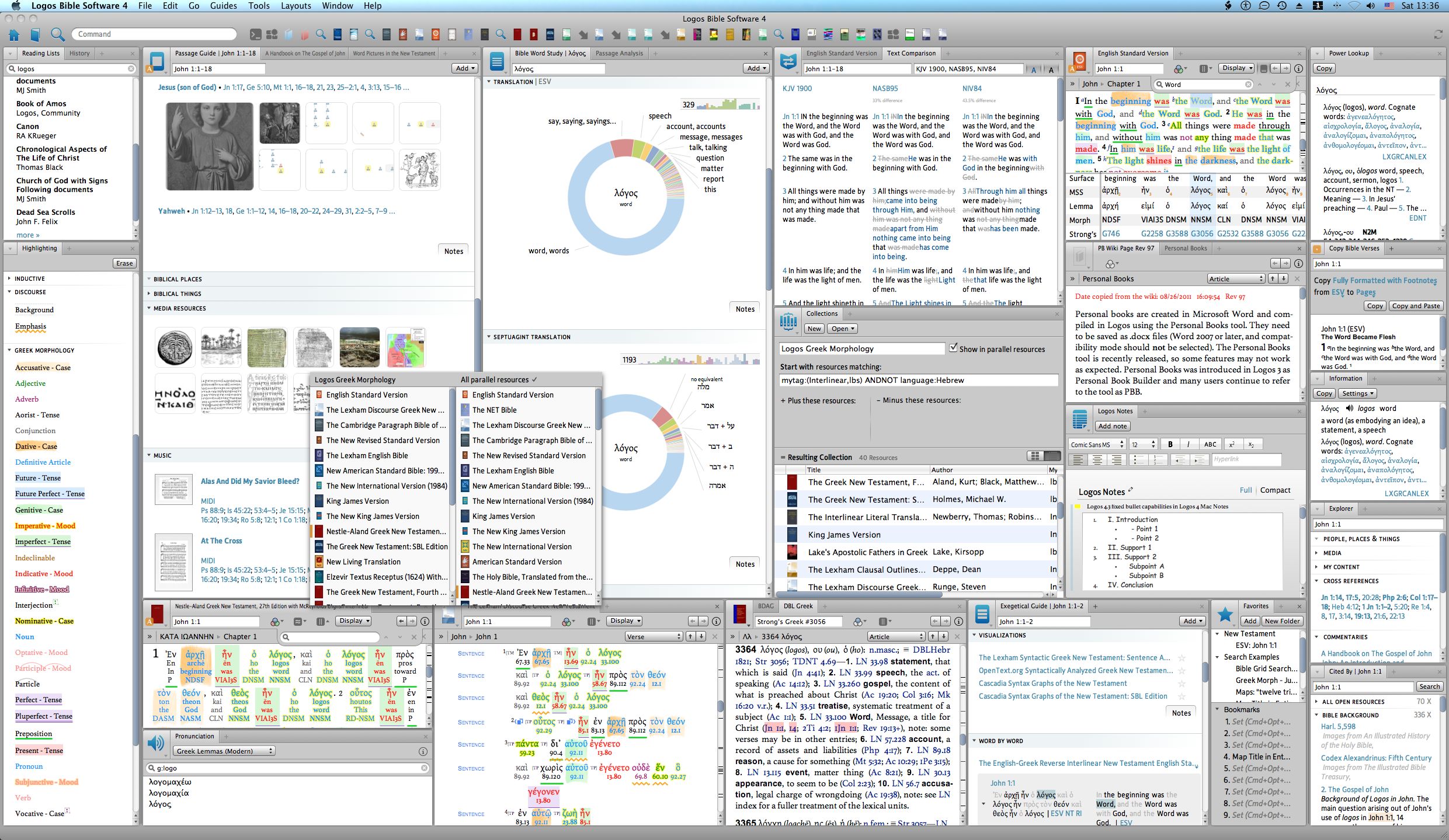
4. My current layouts are working splendidly at this point. I currently have two primary layouts. One that I call “small” or “split” or my “main” layout. And the other is specifically for Greek Reading Class that I do with my kids for their homeschooling. Let me show you each below and provide info:
Main Study Screen:
https://isaachunterthewriter.com/wp-content/uploads/2023/10/main-study-screen.png

This screen came to fruition after a lot of playing around and experimenting, but it is, hands down, the very best configuration I’ve found thus far. It has two main windows, the one on the left and the one on. The right. The left one has two major sections, the left and right. The left has the major translations that I use most often: English Bibles, English LXX/MT, Greek LXX/MT, and the Apostolic Fathers in Greek. The English Bibles has access to all of my modern translations by use of the parallel button and also through simply using the right and left arrows which switched between translations (NKJV, NASB, NIV, NLT, etc). My default English Translation is the NKJV. It does not look as if I’ve actually done a blog post on why I settled on the NKJV as my primary English translation. I will do that in a future post.
The same is true for the English LXX/MT, I can move through the translations with the arrows or select from the button. As well the Greek texts, and I have copies of the Majority Text (Byzantine), the Textus Receptus, the SBLGNT, and the NA28 (as well as a few Hebrew OTs). The Greek Church Fathers is actually a throw back to a previous Greek Study iteration that I am no longer pursuing. But, most of the English and Greek translations or texts are all Reverse Interlinear or Interlinear in nature in that with the press of a button I can access in interlinear fashion the underlining text or a translation of the Greek/Hebrew text. In the English translations, one button has the Greek/Hebrew words appear under each English word. In the Greek texts, a corresponding English word appears under each Greek word. It is fantastic for accessing the underlining languages without knowing the languages or for further study even if you do.
On the right side of the left window is a “Copy Bible” section. This comes in handy when you want to copy a particular Bible verse or paragraph in a certain format. I do this frequently when writing blog posts, not so much any more for teaching since the Sermon Builder immediately hyperlinks or displays the text listed automatically. But, this is the secondary purpose of this section. Its primary purpose (which is ridiculous) is to displace the entire Bible reference. In the left hand section of the left hand within, the English Bibles has a reference spot in the top left corner, but the references are always cut off half way through. Between the two reference sections, I can quickly get a full reference. This is a ridiculous oversight by Logos builders and should be corrected. But I am not holding my breath.
The last section of the left window on the right side is the Information pane. This pane is by far the most useful tool in Logos aside from the search and Reverse interlinears. This is basically a dictionary on crack, providing the dictionary definitions for any word you select from any text, then it provides translation information (as already discussed), plus Lexicographical information as well. My kids really like the fact that in the Word Info section it provides a button for each Greek or Hebrew word that will pronounce it for you. It’s not perfect (we do not follow Erasmus pronunciation) but they really like it and it can be useful at times. I particularly like the Louw-Nida section in the Definition portion and often find myself clicking on its hyperlink (that takes me to the correct entry) for more in-depth information. Of course, I use the Translation section all the time as I want to see how the different English translations rendered each word, comparing translations with each other as well as comparing the Hebrew with the Greek and vice versa.
The right window is separate from the left (detached). It is actually a search window that I have added other tabs to. It contains primarily a Search Tab, several Sermon Builder Tabs (Sunday school, Wednesday Bible Study, Main Sermon), a few books I’m currently reading for courses I teach, then several reference tabs: the Faithlife Study Bible Notes (and all other study bible notes), the Cambridge Commentary, the Pulpit Commentary, UBS Handbooks, two free commentaries (1 volume), an exegetical guide, and a topical guide.
The right pane in this right window is a cross reference section: Treasury of Scripture Knowledge, the Cite tool, and lastly the Textual Variant Apparatus for the NA28 and the LXX.
The search feature here is what is primarily used most of the time. I search for Bible verses and words, etc. I also use the Books search (though less today than I did when using Logos for my Dissertation). But if I really need to find something I can look it up in my entire library if I desire. The only limitation to this I have found is I cannot search my book library and my personal documents simultaneously and have the results listed together, which is cumbersome. To be honest, I have not found a good way to search my documents in Logos (such as Sermons). Most likely I will have to convert my documents to full books in the future, but this is limited because it will not populate personal books across the Logos server to other devices.
The cross reference window on the right side of the right window contains the TSK which is hands down quite useful, though I find it less necessary when using the NKJV, which has ample cross references hyperlinked already in the text. The Cite me tool is quite useful if you want to search your entire library for a particular verse and have it retrieve it all for you and display it in an organized fashion. It works, but I do not use it as much as you might suspect. Lastly, I do not use the Apparatus’ in the last tab, but they are there if we every need them. It might come in handy if I am ever teaching a Textual Criticism class or in our Greek reading for homeschool. But so far the need has not presented itself.
The major benefit of this layout is its bifurcated nature and how it works with Scrivener, and the internet browser. I have all of my windows positioned on the right side of the screen and they are the same width and the right widow in Logos. This way I can do a quick command-tab to pick which program I want. If Logos, it will open the left window. Then I can select the right window with another command-tab. Then if I need the search window or a full screen of logos, simply select it again with command-tab. This allows me to bounce back and forth and also be able to write in Scrivener while having the left Logos window open and useable, especially when quoting from a bible text or book, etc. It is not perfect (if it were I would have a limitless number of screens with all of my data and systems linked together seamlessly in an immersive environment that was floating in a sea of stars – but I am on a budget here).
Greek Reading Screen:
https://isaachunterthewriter.com/wp-content/uploads/2023/10/greek-reading-screen.png
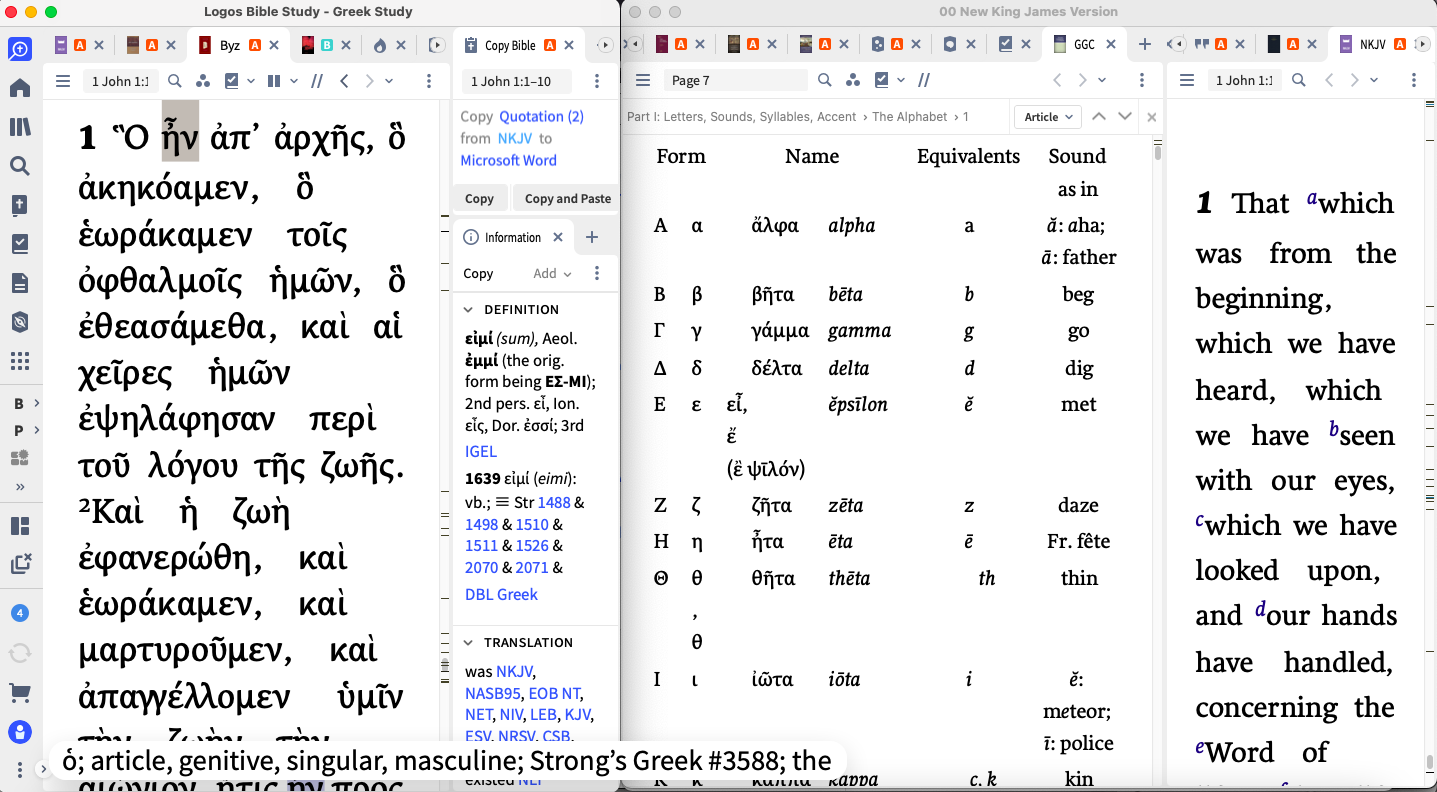
This layout is similar to the “main” layout in that it is also bifurcated in two windows. The left window focuses on the Greek text (currently the Byzantine NT though I would like to get a Textus Receptus in the future that has an interlinear feature and morphology – the current TR in Logos is stripped down. It does have an interlinear but it’s formatting is awkward with each verse being on a new line and it does not work well for reading and studying). The information pane, of course, comes in quite handy for studying the original languages.
The right window has the typical commentary links, etc available, but it focuses on A Greek Grammar for Colleges and specifically the page that has the layout of the Greek alphabet. This will, of course, change as the kids become more fluent in Greek, but currently they need it as a reminder to look up letters they do not remember or their names or their sounds.
Lastly, the right pane in the right window has a simply copy of the NKJV with sympathetic selection activated. This way, if they click on a word in the Greek Byzantine text on the left side it automatically selects the corresponding word in the NKJV on the right. It is a quick and easy way to get a definition or gloss or a clue as to how to use the Greek word in translating and reading. In this right section there is also the tab for the Apparatus’ which may come in handy in the future, but I’m not so sure.
I do want to say, I have started teaching the kids Greek this year. My approach has been contextual, even hyper-contextual in that we have simply chosen a book in the Bible and started reading from the very start – learning the letters in the very first verse and moving to the next word and the next word, etc. There is no formal grammar rules to learn, no punctuation rules, etc. The main focus is for them to learn the Greek letters, pronunciation, and then be able to organically read the New Testament and ultimately the LXX. By the time they are 18 I would like them to be fluent in Koine Greek in that they would be able to read any Greek text in the Bible, and also carry on a conversation with me in Greek as the need arises (would there ever be a need for this?); especially a theological discussion. I think it will also be important for them to have a working conversational knowledge of Spanish as well, which we will probably use Duolingo.
So far, the children have been ecstatic about learning Greek. They always asked to do their Greek studies first when starting off their day and they even ask to do more when the class is over (which is something I think every teach dreams of but rarely ever actually gets). It’s been a wonderful experience and I will blog about it more in the future.

What Have I Purchased that I Regret?
At this point, I have made some purchases that I have not really used all that much or that I seriously regret:
1. UBS Handbooks – though I only paid $299 for this entire set, and despite it being recommended by the late Morris Proctor, I still have not used this commentary set very much at all. It has been a little insightful at times, but not really. It is fourth on my references when looking up a passage. It does have it’s own linked tab so it is always ready at whatever verse I have the main Bibles at. But I simply do not check most of the time. This might change in the future if and when I start teaching actual bible books instead of the reformatted topical study that we are currently undertaking at Sunday school. But, with that said, I do not look too closely at this set when doing the Romans study at the Wednesday Bible Study. So, it really will depend. It does do a great job of handling the text and providing a different perspective, focused on how the words and phrases should be translated into other languages – as this is predominately the focus for missionary translators.
2. The Thomas Aquinas’ Summa Theologica. This collection is very important for me to one day go through, being a philosophy professor myself. But I also purchased it for the kids in their future studies, which will have a heavy philosophical influence, namely, that I want the children to be able to critically think about the situations and problems and worldview they will come in contact with in their lives and be able to handle them rather than fall apart at the first sign of opposition or any genuine argumentation. I want them to be able think critically, logically, biblically, philosophically, and know the difference between reason and faulty logic and fallacies. With that said, though, we are no where near this text yet. But it will be used in the future.
3. Dead Sea Scrolls – this set of documents, while nice to have, I haven’t actually used all that much – maybe once or twice. Again, it is important for me to have this in our personal library so the kids can look up anything they need if and when they need it. It was relatively inexpensive and somewhat informative. I want them to know how to use it and how it fits into the development of the Bible they read and learn from every day.
4. General Book Searching – this is not something I purchased separately but it was a major reason why I purchased Logos in the first place and was used extensively during my dissertation. I have to admit, though, I do not use it as much as I thought I would. A few changes to the layout of results in Logos 10 has made it a little less useful, though I can’t put my finger on exactly why.
5. Personal Books – since the death of my own personal laptop (2 year old poured water on it) and having to subsequently commandeer my wife’s laptop, I have not been able to (have not had the desire to) re-upload personal books. This has been an issue for me since I have several personal books that I would like to include in my searches. Dr. Missler’s notes on every book in the Bible for one. Several theological texts, systematic theologies, etc. I do not want to have to repurchase these expensive volumes again in Logos. This would, of course, give me the opportunity to perfect the transfer option from device to device (between laptops) but I have neither the time nor the desire to do so. It should just do it for me. I recognize that Logos is a business and they want to maximize profit, but I do live on a budget and can only afford so much when it comes to buying books. Maybe if I maintain a personal books backup folder on a flash drive, then I could hot swap that folder to all the other laptops in our family (myself, the kids, my wife, etc) then the indexing feature could work better. I will have to play around with this in the future. It would be one way of getting around their prohibition of allowing personal books on their servers. I definitely want the kids to have access to the Naked Bible Podcast personal books (transcripts of all 400+ episodes in one book) and the entire pdf collection from Dr. Missler as well as large theological works like Systematic Theologies that I already own.
What to be Purchased Soon?
1. I would like to get a better version of the Textus Receptus. This has already been discussed above, but I would like one that has a better flow of the text (more like the Byzantine version) and not one verse per line. I would also like it to be interlinear and have morphology built in. The Academic Professional has two TR versions (Elzevir 1624 and Stephen’s 1550) and both have Morphology. So it is possible this is forthcoming in my next purchase.
2. Upgrade to Academic Professional – I have longed to upgrade to this package. It is the pinnacle for me for several reasons. First, it provides #1 (I think). It also provides the BDAG ($130), Liddell and Scott’s Lexicon ($100), then the TDOT/TDNT ($680), then the ICC ($1800), and the EGGNT ($300). It also provides the Douay-Rheims Catholic Bible, the Anchor Yale Bible Dictionary (6 vol), Nave’s and Torrey’s, an extensive collection of the Gospel of Thomas, Student’s Guide to Textual Criticism, Josephus in Greek, Tischendorf’s TR, Apocrypha and Pseudepigrapha in English, the Greek UBS5 with Apparatus (I would then have all the majors including Westcott and Hort), The NETS LXX in English, the Latin Vulgate (interlinear), Peshitta, Babylonian Talmud, various Targums, Lightfoot’s Apostolic Fathers (already have Lake’s), Baptist Confessions of Faith, and the Westminster Confessions of Faith, Larger and Shorter Catechisms (Reformed), and a Composite Gospel: Parallel Passages (interesting). This all together would cost: $3000+. I can purchase it for less than $680. Awhile back there was a code that took another $100 off the price, but I let it slip away and it does not appear to be returning any time soon. I wonder if it was a mistake.
3. Lange’s Commentary – I loved this commentary set when I was using the Word Bible Software. It is reformed so would be interesting.
4. Philosophy Collection – I definitely want this collection for the philosophy books, especially the basic ones. This is less important now that I’m not going to be teaching the courses in philosophy that I wanted but will be teaching instead: intro to Christian Philosophy, Intro to Logic, and I’m assuming a third, probably Intro to Metaphysics. We will see. But it would be good to have a well rounded curriculum for the kids.
5. Orthodox Legacy Library – I would like to have some authoritative titles on Orthodox Christianity.
6. Barth’s Church Dogmatics – the more I look into this philosopher’s work the more I want to read this systematic theology.
7. Apocrypha/Deuterocanonical Commentary – I would like to have a well rounded collection of background information on the extra-biblical books and documents.
8. Holman OT Commentary (paired with Cambridge Greek Testament for Schools and Colleges) – these are hybrids. I am purchasing this OT commentary simply to have something to pair with the Cambridge GNT Commentary which I loved in TW5.
9. Keil and Delitzsch Commentary (paired with Meyer’s Critical and Exegetical Commentary on the NT) – this is the same as #8, to be paired with Meyer’s Exegetical NT, a beloved title I used extensively in TW5.
10. Expanded version of JFB – I have, apparently, the free stripped down version of this commentary. Would like to have the full one.
11. Systematic Theology: Grudem – this will be used primarily for the children’s schooling. I thought he was much more Charismatic but then found out he was reformed. Is it possible to have a reformed charismatic? This will be paired with other systematic theologies as well, especially with Barth’s.
12. Reformed Dogmatics – again, I’m a sucker for systematic theologies and especially for reformed scholarship.
13. New Schaff-Herzog Encyclopedia of Religious Knowledge – this is an interesting collection, I’m a big fan of Philip Schaff.
14. Adam Clarke’s Commentary on the Bible – this commentary I would like to get for nostalgia. I had the single volume version in print form back when I packed around a duffle back on wheels full of Bible translations and exhaustive concordances, etc. This was my go to commentary for a few years. Very small print. It would be nice to have this expanded version and much larger print.
15. Handful of other books like Theology, Death, and Dying; Dying and Death: Getting Rightly Prepared for the Inevitable, etc. These of course are too numerous to list here. There are a few courses that I want to purchase from logos for my wife and myself on relationships, a few more books, etc.
What Am I Currently Studying, How, and Why?
Currently my study foci is divided in several directions.
1. I’m teaching Sunday school, Wednesday Bible Study for a church member who hosts it at their home, and homeschooling the kids in Bible and Greek lessons.
2. I’m currently pursing my own personal studies at the Koinonia Institute where I am a mentor and a student. I’m working through the book of Romans and I am 7 courses away from finishing the Silver levels and then will be moving on to the final Gold level. I have completed all 10,000 K-Credit requirements (translated into 500 hours of practical ministry work). Gold will require 1000 practical ministry hours, approximately 25 courses, and a final capstone ministry project. I would imagine this will take me another two years or more to complete.
3. My wife and I do (or try to do) our own Bible Study every weekday. It is a book by book study that is also and will be laced with topical studies (as we read a topical book, or do a topical study together, etc). We last left off half way through Hosea. Once we finish with this, we will be selecting a relationship book to go through together. Then back to another book in the Bible. One of the goals we both agreed to when we were courting is that we wanted to read and study through all 66 books of the Bible together.
What Do I REALLY Regret Purchasing? Why?
This is still, hands down, the worst purchase I’ve made thus far with Bible Software: Accordance. You can read elsewhere on how abysmal I found this program to be. Perosnally I’m even more frustrated with the fact that, thus far, I cannot even give this account/program away to someone else. I’m thinking of doing a giveaway through my seminary to a student or doing a blog giveaway, etc. It would be well worth the $25 transfer fee to give it to someone else who could use it and so the company would have to honor it.
I will have to think on this some more.
What Would Be My Dream Purchases?
The Academic Professional is the highest tier of this version available on Logos. But, if I were to win the lottery, and with dynamic pricing, I would pick first the Academic Professional ($680), then the Standard Collector’s Edition ($6000), plus the Baptist Portfolio ($2700), then the Reformed Portfolio ($2700). Of course, I would have to spend a few months reviewing all the titles and seeing if any of these would actually be worthwhile. I do not like to purchase the “biggest” simply because I think it is the best because of its cost.
At the moment, my wife is encouraging me to purchase about $1400 worth of materials for so far collected birthdays and anniversary gifts that I was supposed to take advantage of but never actually pulled the trigger on. She is also pushing me to purchase a new MacBook (new to me anyway) with 16 gb of ram and a 512 gb hard drive since our 2 year old destroyed my previous computer that had only 8 gb of ram. We have compromised on setting a budget of $200 per month to spend on Logos, which of course I have not stuck to and haven’t spent more than the $0 it costs for the free book each month.
One major motivation I have with purchasing Logos products these days is the kids. I want them to have the best research library at their disposal and since they all three have or will have their own laptop with their own copy of Logos on it, it would be foolish not to take advantage of it. Plus, when they are 12-15 they will begin taking classes at KI and they will be doing major research projects on biblical topics, so an extensive and robust library would be very useful. God I do wish I had been homeschooled when I was a kid like they are today. I would have killed for that kind of academic freedom to pursue knowledge of its own sake.
All told, if I had my way I would spend a total of $12,000 approximately to round out the library in Logos. Of course, this would require extensive beforehand analysis of all the volumes in question to see if the purchase of that package was worth it. I would probably get on the phone and have the Logos sales team help me out with a customized package to do the major lifting on the research. I would also have to take into consideration the footprint that would have on my hard drive. Of course, there would be many volumes that I simply would not download because they would be irrelevant.
But that’s the kind of thing I dream about when laying awake in my bed at night, unable to sleep. I do not count sheep. I count books in Logos.
Conclusion
Not much has changed in the way I use Logos, though not so often do I search the entire library or do an exhaustive book search for different keywords like I did for my doctorate program. But, it is still an incredibly useful tool and I would highly recommend it.
Until my next post……
Excerpt from The Light Aurora:
The door’s lock released and Dr. Lewis looked around at each of them.
“Stay close, and be ready for anything. I’m not sure if they’re all in the Command Center or if they are trying to secure Level 4. Hell, they could all be evacuating.”
He stared at Scott as he came up onto the landing.
“Let’s go,” Scott said.
Dr. Lewis pushed the door open and walked out into the hall, followed by the others – in ones and twos. Level 2 was similar to the other level, with a long corridor, doors on either side, all with security displays recessed into the wall next to them.
But, as they entered the corridor, Scott’s breath caught in his throat. As he stood there with the others, he couldn’t believe what he was seeing. In front of them, probably no more than a few yards away, were three bodies lying on the floor. One was sitting up against the wall, the side of his face melted, exposing his right eyeball and a good portion of his right skull. Another one was laying face down, his entire back opened up at the spine, as if his spinal cord had been ripped out of him from behind. The last one was a few more feet away from the others, on his back, his eyes seared from his head, black, burnt flesh where his eyes used to be.
The intercom came back to crackling life.
“Professor?” Derrick said over the intercom.
“Don’t worry. You can answer,” he said. “I can hear you.”
Scott looked up, then fixed his gaze on the security camera at the end of the corridor.
“Yes?” Scott finally asked.
There was a pause, static.
“What are you doing, Derrick?” he asked. “Did you do this?”
“Indeed,” Derrick said, coming back on.
“Why?”
“They refused to help me.”
“What are you trying to do, Derrick?” Scott asked.
There was another pause.
“I want to go home, Professor,” the boy said.
“Home?”
“Yes,” Derrick said, his tone soaked with some other-worldly confidence that did not belong in an innocent, ten year old boy.
“I want to go home, Professor,” he said again. “Would you be interested in coming home with me?”
Buy the entire story The Light Aurora today and get ready for the thrill ride of a lifetime! What is this foreign and hostile place these strangers find themselves in? What does it all mean? Will all of them survive?
Click here and grab your copy today! All three books in one!
But, trust me when I say, reading this book will change your life forever.
What do you think?